
The pattern repeats across portal audits. A company runs paid lead generation for two or three years, accumulates tens of thousands of records, and then treats that database as a liability rather than an asset. The stated reason is almost always data quality. The assumption underneath is that reactivation requires a new data purchase, an enrichment vendor, or a rebuild of the intake stack.
That assumption is usually wrong, and it is expensive to hold. A manufacturer running two paid social lead forms had collected 18,754 and 12,009 submissions respectively. More than 99 percent carried an email address or a phone number. Effectively none had received a follow-up. The prevailing internal view was that the file was unusable without new information.
The file was usable. The information required to route each lead to a specific product was already present. It was sitting in properties nobody was querying, under labels nobody recognized, while the properties with clean human-readable names sat empty.
What follows is the build, not the campaign results. The first send wave has not yet been measured, and speculative performance claims are worth less than a follow-up carrying real numbers.
Where should a dormant lead reactivation project actually start?
A dormant lead reactivation project starts with a field coverage count, because coverage determines whether personalization is possible at all.
The instinct is to export the list and start writing copy. That sequence guarantees rework. Fifteen minutes of counting non-null values across the properties the segmentation would depend on decided the entire shape of the project before a single email was drafted.
The count produced two lists. The populated fields: component manufacturer at 92.3 percent, capacity rating per unit at 92.5 percent, number of units at 92.5 percent, equipment manufacturer at 69.6 percent, equipment model at 64.3 percent, email at 99.7 percent, phone at 99.3 percent. The empty fields: equipment type at 0.3 percent, configuration type at 0.3 percent, material preference at 0.3 percent.
That contrast is the finding. The expensive fields, the ones requiring a customer to look up a specification, were populated. The cheap fields, the ones answerable from a single dropdown in under five seconds, were empty. No enrichment vendor sells the missing three. They were never asked for.
Gain property insights: understand where and how properties are used in your CRM.
Why does a mature portal end up with duplicate properties?
Duplicate properties accumulate because each new intake path creates its own property rather than binding to the existing one.
A website form, a paid social integration, a booking link, and an import each ask the same question in slightly different words, and each writes to a different field. Three years later the same question has been asked four ways into four fields, and no single field holds complete data.
The specifics from this portal are ordinary, which is what makes them useful:
- A short-labeled unit count field was populated on 0.6 percent of records. A separate field phrased as the full customer-facing question was populated on 92.5 percent. Both asked the same thing. The live booking form was bound to the empty one.
- A field labeled "Equipment Make" was populated on 0 percent of records. "Equipment Manufacturer" was populated on 69.6 percent.
- A dropdown-type dimension field was empty. A text-type field with the same intent held over 28,000 values.
- Two properties shared an identical display label. One held 28,421 records. The other held 11,362. Nothing in the interface distinguished them.
The cost is not aesthetic. When a booking form is bound to the wrong twin, a customer answers a question, the answer lands in a field no automation reads, and the customer is then treated as though they never answered. The organization concludes it lacks data. It does not lack data. It lacks convergence.
The fix pattern is worth naming precisely: one concept, one property, every intake path writing to it. Where a clean dropdown version and a messy text version both exist, standardize on the dropdown, normalize the historical text values into it, and repoint every form and workflow at the survivor.
Should segmentation logic be invented or transcribed?
Most companies already own their routing logic, usually on the website, and encoding it is transcription rather than invention.
This client had a product-matching tool published on their site. It amounted to twelve ordered rules, evaluated top to bottom, first match wins. That structure maps almost exactly onto how a workflow branch evaluates conditions, which meant the segmentation model did not need to be designed. It needed to be moved into the CRM and run against the dormant population.
Rule ordering is the substantive design decision, not rule content. In this file, 4,112 leads carried an ambiguous capacity value, but only 3,287 landed in the ambiguous segment. The remaining 825 belonged to a configuration class evaluated earlier in the sequence, so they had already been routed by a prior rule. Reverse the order and the segment sizes change materially without any rule text changing.
Every lead came out of the run with a product recommendation, a confidence rating, and where applicable, a note describing what was blocking a confident answer.
When should a routing engine refuse to make a recommendation?
A routing engine should refuse to recommend whenever a confident wrong answer would cost more than an honest question, and it should identify those records explicitly rather than defaulting them.
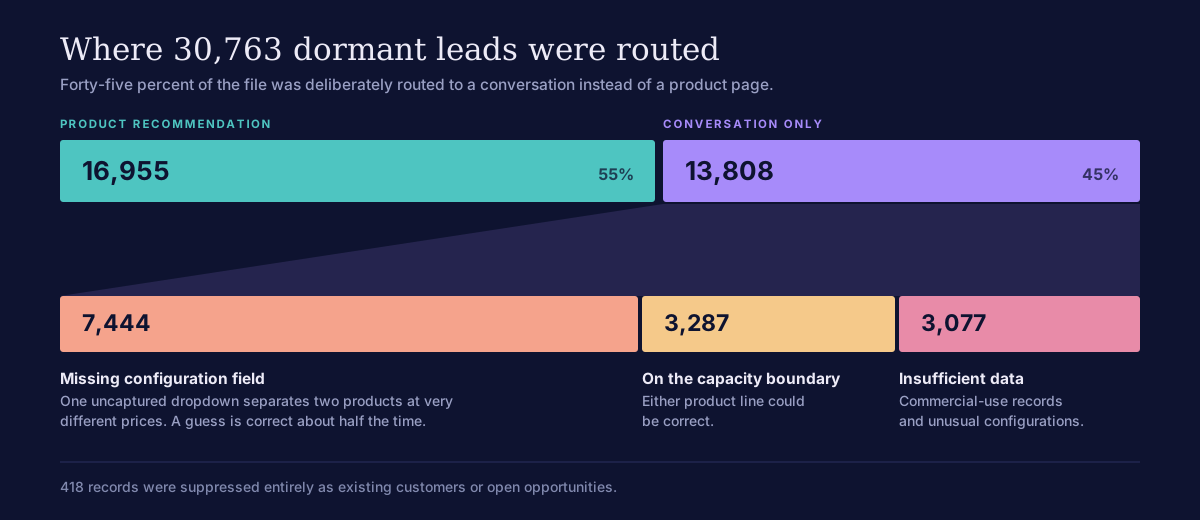
Of 30,763 leads, 13,808 received no product recommendation at all. That is 45 percent of the file deliberately routed to a conversation instead of a product page. Three groups drove that decision.
7,444 records in a single configuration class. These setups accept one of two different products depending on a characteristic the form never captured. The two products differ substantially in price. A confident guess would have been correct roughly half the time, and wrong in a way that surfaces at the worst possible moment, when a customer receives a quote well outside what they expected.
3,287 leads sitting precisely on the capacity boundary between two product lines. Either line could be correct depending on how the owner actually uses the equipment. The engine could have defaulted them to the lower-priced line and nobody would have noticed the assumption was made.
3,077 leads with genuinely insufficient data, including commercial-use records and unusual configurations.
Automated personalization becomes dangerous exactly at the point where it becomes confident. The value of encoding routing logic is not that it labels every record. It is that it identifies, precisely and at scale, which records cannot be labeled responsibly. A segmentation model that produces a clean answer for 100 percent of a file has almost certainly buried its uncertainty rather than surfaced it.
That decision created a copy requirement worth noting. The boundary group had submitted complete information. A generic "tell us about your setup" message would have implied their submission was lost. They needed messaging that acknowledged their data was on file and explained why a human conversation was still the right next step.
Why do most personalization failures start at the form, not the model?
Nine of the twelve routing rules depended on two fields the lead form never asked for, which makes this a capture failure that surfaced two years later, not a modeling failure.
Equipment type and configuration type are both single dropdowns. Both take a customer under five seconds to answer. Their absence produced 7,444 records that could not be routed to a product, roughly a quarter of the entire database, each one now requiring a manual conversation to resolve. The cost of asking those two questions at the outset was effectively zero.
The inversion is the part worth checking in your own portal. Before the rebuild, the two required fields on the booking form were qualitative questions that routed nothing. The three fields that determined the entire recommendation were optional. That configuration is common and it is almost always accidental.
The audit that matters is therefore not "how good is our segmentation." It is "does our intake capture the fields our segmentation depends on."
What this supersedes.
Reactivating a dormant database requires purchasing new data or an enrichment vendor. Segmentation quality is a copywriting and modeling problem. A good routing model assigns every record to a segment.
The data required to personalize is usually already in the portal, split across properties nobody reads. Segmentation quality is determined at intake, years before the campaign. A good routing model's most valuable output is the set of records it declines to label.
How to build this in HubSpot
The implementation is mechanical once the coverage picture is clear. Five components, built in this order.
Coverage audit. Export every property that the intended segmentation touches and count non-null values. Sort by fill rate. The duplicate twins reveal themselves immediately: two properties, same concept, one near-empty and one near-complete.
Property convergence. Choose the survivor per concept, preferring dropdown types over free text. Normalize historical text values into the dropdown's option set. Before any backfill, validate source values against destination options. In this build, the target dropdown was missing one value that 741 records required, which would have silently defaulted them to "Other" during migration.
Routing workflow. Transcribe the existing business logic as an ordered if/then branch, first match wins. Write the recommendation, a confidence rating, and a blocking-reason note to three custom properties so every downstream list is queryable and auditable.
Active lists and suppression. One list per audience, built on the recommendation and confidence properties. Suppress customers and open opportunities before anything else.
Intake rebuild. Repoint every form to the surviving properties, order the questions the way a customer thinks about the product, and make required exactly the fields that drive routing.
For a portal at this scale, the audit and convergence work runs about two days. The routing workflow and list build runs about one. The form rebuild is a half day. The unglamorous first step is the one that determines whether the rest is possible.
